
Moving data from on-premises to AWS involves seven core steps: plan around business outcomes, inventory, and assess your estate, select the right migration strategy per workload, design a secure landing zone, choose fit-for-purpose tools, execute with incremental syncs and automation, then validate and optimize. Done well, this minimizes downtime, reduces risk, and accelerates time-to-value.
If you’re asking how to migrate data from on-premise to AWS, the short answer is: plan around business outcomes, inventory, and assess your estate, select the right migration strategies per workload, establish a secure landing zone, choose fit-for-purpose tools, execute with incremental syncs and automation, validate thoroughly, and then optimize costs and performance.
Done well, this approach minimizes downtime, reduces risk, and accelerates time-to-value while strengthening governance and compliance.
Preparation and planning for migration
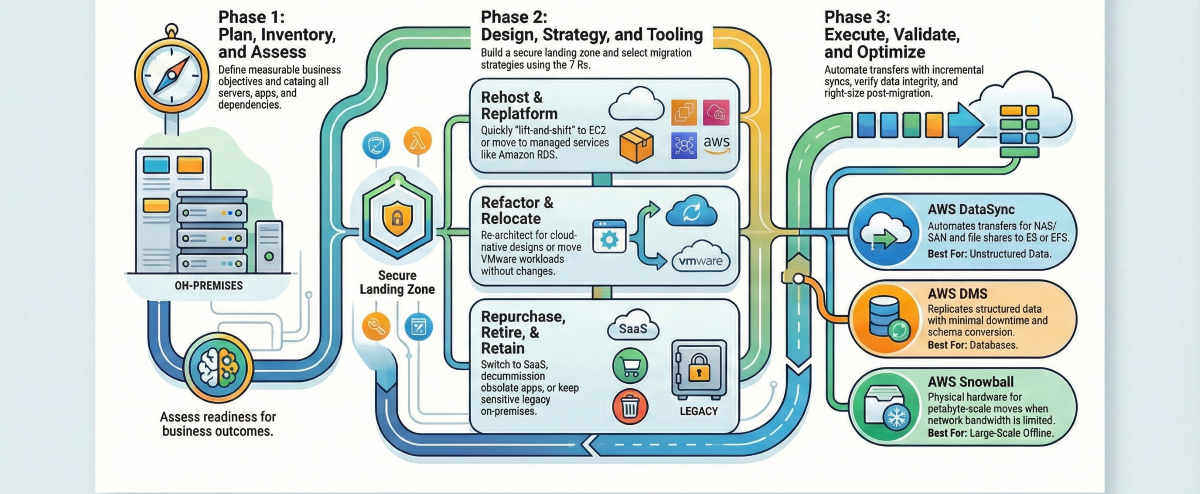
Start with the business case, not the tools. Define measurable objectives (e.g., reduce infrastructure costs by 25%, improve recovery time by 50%), KPI baselines, and the value thesis for your cloud move. Working backward from outcomes clarifies scope, budget, and sequencing. Structure migration waves that begin with lower-risk, low-dependency workloads, allowing you to refine your process before tackling mission-critical systems.
This is a proven way to reduce disruption and surface surprises early. Establish the migration governance model (decision rights, risk controls, change management) and your AWS operating model upfront, aligning to security, compliance, and scalability requirements outlined in AWS best practices for choosing migration approaches.
A helpful planning matrix:
| Planning step | Key stakeholders | Primary outputs |
| Define business objectives & KPIs | CIO/CTO, finance, product owners | Success criteria, ROI model, and budget |
| Establish governance & operating model | Security, compliance, and architecture board | RACI, guardrails, change control, escalation paths |
| Create migration waves & timeline | Program manager, app owners, infra leads | Wave plan, runbooks, cutover windows |
| Risk, dependency, and rollback planning | App owners, DBAs, network/security | Risk register, rollback plans, freeze windows |
| Communications & training | PMO, leadership, IT ops | Stakeholder plan, training schedule |
| Landing zone design sign-off | Cloud architects, security, and networking | Account structure, policies, baseline IaC |
Discovering and assessing on-premises data and workloads
Discovery is the systematic cataloging of servers, storage, networks, applications, and the dependencies between them. It captures configurations, utilization, and performance so you can scope effort and reduce risk.
Automate this where possible: AWS Application Discovery Service collects host metadata, performance profiles, and network connections to inform migration planning and right-sizing, which helps teams align early migration decisions with long-term AWS data engineering requirements.
Centralize progress, inventory, and tooling orchestration with AWS Migration Hub, which provides a single view across assessment, migration, and cutover. For automated sequencing of migration workflows, AWS Migration Hub Orchestrator extends this further by automating and coordinating the steps across migration waves, reducing manual handoffs.
Sample inventory checklist:
- Data and files: shares, NAS/SAN, object stores, size and growth, file counts, retention policies
- Databases: engines/versions, sizes, schemas, replication, maintenance windows, licensing
- VMs/servers: OS, CPU/memory/storage, utilization, patch levels
- Applications: SLAs, RTO/RPO, inter-service dependencies, release cadence
- Network: bandwidth, latency, firewall rules, VPNs/private links
- Security/compliance: data classifications, keys/certificates, audit requirements
- Tooling/licensing: monitoring, backup, APM, database licenses, and support windows
Defining migration strategy using the 7 Rs framework
The 7 Rs framework categorizes migration strategies as rehost, replatform, refactor, repurchase, retire, retain, or relocate to match each workload’s needs. Choosing the right “R” depends on cost, technical debt, business criticality, risk tolerance, compliance, and future scalability. Always perform deep discovery before locking a migration type to avoid costly rework later.
| Strategy | What it means | Good fit examples | AWS services | Real-world example |
| Rehost | “Lift-and-shift” to AWS with minimal changes | Stable VMs moving to Amazon EC2 quickly | Amazon EC2, AWS Application Migration Service | Moving a Windows-based web server as-is to EC2 with the same configuration |
| Replatform | Make limited changes to use managed services | Move self-managed MySQL to Amazon RDS | Amazon RDS, Elastic Beanstalk, Amazon ECS | Migrating an app to EC2 but replacing a self-managed database with Amazon RDS for automated backups and scaling |
| Refactor | Re-architect to cloud-native designs | Monolith → microservices on containers/serverless | AWS Lambda, Amazon DynamoDB, Amazon EKS, Amazon SQS, Amazon EventBridge | Breaking a monolithic application into microservices deployed on EKS with an event-driven architecture |
| Repurchase | Replace with SaaS | Legacy CRM → SaaS CRM | Integration with third-party SaaS platforms | Replacing an on-premises CRM system with a cloud-hosted SaaS alternative |
| Retire | Decommission unused workloads | Duplicative or obsolete apps | Not applicable | Shutting down a legacy reporting application no longer used by any department |
| Retain | Keep on-prem for now | Low-change, high-risk legacy under constraints | AWS Direct Connect, AWS Outposts, VPN, AWS Storage Gateway | Keeping a SCADA control system on-premises while moving analytics workloads to AWS |
| Relocate | Move VMware VMs without changes | Large VMware-based data centers need quick cloud adoption | VMware Cloud on AWS | Moving hundreds of VMs from an on-premises vSphere cluster to VMware Cloud on AWS without re-architecture |
How to choose the right “R” for each workload:
- Perform deep workload discovery using AWS Migration Hub or third-party tools.
- Map business goals (cost reduction, agility, innovation) to the migration approach.
- Segment workloads by complexity, risk, and dependency.
- Document the rationale behind each choice to justify decisions to stakeholders.
Designing the AWS target environment and landing zone
A landing zone is a pre-configured AWS environment that codifies your governance, security, networking, and account structure so incoming workloads have a safe, scalable home. The standard mechanism for deploying a landing zone at scale is AWS Control Tower, which automates multi-account setup and enforces baseline guardrails using Service Control Policies (SCPs) through AWS Organizations.
Design according to the AWS Well-Architected Framework, covering reliability, security, cost, performance, and operational excellence, so day-two operations are simpler and less error-prone. Define multi-account patterns, identity and access boundaries, network topology (VPCs, subnets, routing, inspection), and baseline controls (logging, monitoring, encryption).
Key components to define during landing zone design include account vending for consistent account provisioning, SCPs to enforce boundaries across the organization, and VPC architecture covering subnets, routing tables, and inspection paths. Pilot migrations with non-critical workloads to validate assumptions, stress network paths, and tune IAM and guardrails before larger cutovers. This foundational setup also ensures that AWS real-time data pipelines can operate securely and reliably within the landing zone, maintaining consistent connectivity, performance, and compliance.
Selecting the right AWS migration tools and services
Tools shape speed, risk, and downtime. Choose by data type, size, latency needs, and connectivity.
| Tool/service | Best for | What it does | Approximate cost signal |
| AWS DataSync | File/object data, NAS/SAN | Accelerates and automates transfer between on-premises storage and S3, EFS, or FSx | No upfront cost; charged per GB transferred |
| AWS Database Migration Service (DMS) | Heterogeneous/homogeneous DBs | Replicates with minimal downtime; supports ongoing change data capture for cutover | Instance-hour pricing; no data transfer charge within the same region |
| AWS Application Migration Service (MGN) | Servers and apps | Continuous block-level replication and automated cutover to EC2 | No charge for the service; standard EC2/EBS rates apply |
| AWS Snowball | Petabyte-scale offline moves | Rugged devices to transfer data when bandwidth is constrained | Device rental fee plus per-GB charges |
| AWS Transfer Family | FTP/SFTP file transfers to AWS | Transfers unstructured data to S3 or EFS via SFTP, FTPS, or FTP protocols; integrates with standard FTP clients | Fixed hourly charge while enabled, plus per-GB upload/download fees |
| AWS Storage Gateway | Hybrid access | Extends on-prem apps to cloud storage with local caching | Based on storage type and data transferred |
| AWS Direct Connect | Consistent, high-bandwidth links | Private network connectivity to AWS for steady transfer and lower latency | Port-hour and data transfer pricing |
Decision guide — which tool to use:
- Data volume under 10 TB with good bandwidth → AWS DataSync or AWS DMS
- Data volume over 10 TB with poor or limited connectivity → AWS Snowball
- FTP/SFTP file transfer from dependent applications → AWS Transfer Family
- Ongoing hybrid access between on-premises and AWS is needed → AWS Storage Gateway
- Dedicated, consistent, high-throughput connectivity required → AWS Direct Connect
AWS DataSync vs. AWS DMS — key difference: DataSync is built for file and object data (NAS, file shares, S3-to-S3). DMS is purpose-built for structured database migrations with support for heterogeneous engine conversions and continuous change data capture. Use both together when a migration involves both file systems and databases.
Migrating unstructured data and file systems
A significant category often overlooked in migration planning is unstructured data; files on NAS/SAN shares, FTP locations, and native Windows or Linux file systems. These require different approaches from database migrations.
Scenario 1: NAS/SAN shared storage to AWS: When multiple applications share a network file system on-premises, AWS DataSync is the recommended path. It migrates data from NFS or SMB shares to Amazon EFS or Amazon FSx, and can be scheduled for regular synchronization to keep source and target aligned during the transition period. This is especially useful when some applications remain on-premises while others move to AWS.
Scenario 2: FTP/SFTP file transfers: When dependent applications deliver files via SFTP to an on-premises location, AWS Transfer Family provides a managed SFTP/FTP endpoint that writes directly to Amazon S3 or Amazon EFS. It supports private VPC endpoints for secure internal transfer, integrates with standard FTP clients without application changes, and handles authentication via SSH key pairs to avoid hardcoded credentials.
Scenario 3: Native file system data on Windows or Linux servers: When data lives on a native file system (NTFS, ext4, xfs) and isn’t exposed as a network share, traditional tools such as rsync (Linux) or robocopy (Windows) can pull data to an EC2-mounted EFS or EBS volume. This approach is well-suited for targeted, one-time migrations where data volume is under 1–2 TB and Direct Connect bandwidth is available.
For very large unstructured data sets (many terabytes) where network transfer is not feasible, AWS Snow Family devices provide a physical offline transfer option. These approaches complement cloud ingestion pipelines and set the stage for connecting AWS IoT Analytics with your newly centralized telemetry or file-based datasets.
Executing data transfer and migration tasks
A crisp, repeatable runbook reduces risk:
- Schedule initial transfers during off-peak hours; throttle to protect production
- Run full load, then incremental syncs to keep source and target aligned
- Validate data and application functionality in AWS staging
- Plan a brief freeze window; perform final delta sync and cutover
- Monitor post-cutover closely; decommission legacy environments per plan
Automate wherever feasible, like pipelines, replication jobs, infrastructure as code, and cutover steps, to minimize manual error. Using a purpose-built ETL Tool For AWS Data Pipelines can simplify these tasks by handling schema drift, incremental loads, and monitoring, reducing the risk of errors during migration.
Do:
- Dry-run transfers and failovers
- Capture runbooks as code
- Tag all resources for cost and ownership
- Communicate change windows early
Don’t:
- Skip dependency checks
- Assume bandwidth without measurement
- Change app versions mid-migration
- Cut over without a tested rollback
Validating migration success and ensuring data integrity
Data integrity means everything arrived accurately, completely, and unaltered. Validate on three fronts:
- Data: row/object counts, checksums/hashes, spot sampling, referential integrity
- Functionality: application smoke tests, user journeys, batch jobs, integrations
- Non-functionals: performance baselines, security controls, IAM permissions, backups
AWS DMS provides replication monitoring and can automatically resume interrupted tasks, helping you verify near-zero data loss during database moves. Document all checks, keep immutable backups, and maintain a clear rollback path until sign-off.
Operating post-migration and optimizing cloud usage
Transition to steady-state with proactive monitoring and cost control:
- Observability: Amazon CloudWatch metrics/alarms, logs, and traces; set SLOs and alerting
- Cost optimization: right-size instances, leverage Graviton, use Savings Plans/Reserved Instances, and eliminate idle resources guided by the Well-Architected Cost Optimization pillar
- Automation: auto scaling, scheduled starts/stops, patch baselines, and backup policies as code
Modernize incrementally; shift self-managed databases to Amazon RDS or Amazon Aurora, centralize data on Amazon S3, and expose analytics via managed services. Periodic reviews can unlock resilience improvements and new data capabilities. If you need a partner, Folio3 Data’s data modernization services apply this lifecycle approach end-to-end.
Ensuring security and compliance throughout migration
Bake in security from day one. Establish least-privilege access with AWS Identity and Access Management, manage encryption keys with AWS Key Management Service, and capture compliance artifacts as workloads move. Best practices include:
- Encrypt in transit and at rest for all transfers and storage
- Enforce role-based access controls and MFA
- Centralize logging and audit trails
- Maintain evidence for regulatory frameworks
Use the Well-Architected Security Pillar as a north star and schedule periodic assessments or third-party audits for critical systems.
Minimizing downtime and risk during migration
Lower risk by migrating in waves, piloting low-risk workloads first, and scripting cutover. Real-time replication for databases and file systems keeps deltas small and cutover windows brief. Account for network throughput, dependency maps, and schema conversion testing to avoid common pitfalls.
For heterogeneous database migrations, for example, Oracle to Amazon Aurora PostgreSQL, the AWS Schema Conversion Tool (SCT) should be run before AWS DMS. SCT assesses the source schema, identifies incompatible objects, and generates a converted schema for the target engine, surfacing issues before any data moves. This is a required step in any heterogeneous migration and significantly reduces rework during cutover.
Frequently Asked Questions
What are the main strategies for migrating data from on-premises to AWS?
The main strategies follow the 7 Rs framework: rehost (lift-and-shift), replatform (managed service optimization), refactor (cloud-native re-architecture), repurchase (replace with SaaS), retire (decommission), retain (keep on-premises temporarily), and relocate (move VMware workloads via VMware Cloud on AWS).
Which AWS tools are best for migrating databases and applications?
AWS Database Migration Service (DMS) is ideal for structured database migrations, supporting both homogeneous and heterogeneous moves with continuous change data capture. AWS Application Migration Service (MGN) handles server and application migrations via continuous block-level replication.
What is the difference between AWS DataSync and AWS DMS?
AWS DataSync is designed for unstructured data — files, objects, and storage shares (NAS, S3, EFS, FSx). AWS DMS is designed for structured relational and NoSQL database migrations, with support for schema conversion and live change data capture. They address different data types and are often used together in the same migration program.
When should I use AWS Snowball instead of DataSync or Direct Connect?
Use AWS Snowball when your data volume exceeds what can be transferred practically over the network, typically 10 TB or more, or when available bandwidth is severely limited. DataSync and Direct Connect are better suited for continuous, online transfers where network throughput is sufficient and ongoing synchronization is needed.
How long does it take to migrate data from on-premises to AWS?
Migration timelines vary widely by scope. Small workloads (a few servers, under 1 TB of data) can complete in days to weeks. Mid-size programs (50–200 servers, mixed databases) typically take three to six months when properly planned with waves. Large enterprise estates (hundreds of servers, complex dependencies, compliance requirements) commonly span six to eighteen months.
How much does it cost to migrate to AWS?
Migration costs have several components. AWS data ingress (transfer into AWS) is generally free. Egress charges apply when transferring data out and vary by service and destination. AWS DataSync charges per GB transferred with no upfront cost. AWS Snowball involves device rental plus per-GB fees.
What is a landing zone in AWS migration?
A landing zone is a pre-built, governed AWS environment that provides a secure, scalable baseline for all incoming workloads. It defines the multi-account structure (via AWS Organizations), enforces guardrails using Service Control Policies (SCPs), establishes network topology (VPCs, subnets, routing), and sets baseline security controls like logging, encryption, and IAM boundaries.
Conclusion
Migrating data from on-premises to AWS is a complex but manageable process when approached systematically. Success depends on thorough planning, workload discovery, selecting the right migration strategies per the 7 Rs framework, designing a secure landing zone, and using purpose-built AWS tools for structured and unstructured data. Incremental transfers, automation, validation, and post-migration optimization reduce downtime, maintain data integrity, and ensure cost-effective, compliant cloud operations. Organizations that combine strategic planning with the right mix of AWS-native, SaaS, or hybrid tools can achieve a smooth, scalable, and secure cloud transition.
Folio3 Data Services supports this journey by providing end-to-end AWS migration and data modernization solutions. From planning and pipeline orchestration to lakehouse integration and ML-ready datasets, Folio3 helps enterprises accelerate migrations, maintain governance, and extract actionable insights from every system and dataset with minimal risk.